
Take Full Control of Your Documents with All-About-PDF DRM Protection
When you share a PDF, you usually lose control of what happens next. It can be forwarded, copied, printed, screenshotted, or accessed from anywhere in the world without your knowledge.
All-About-PDF DRM changes that.
Our Digital Rights Management (DRM) technology gives you enterprise-grade control over who can access your documents, where they can access them from, and what they can do with them — even after the file has been distributed.
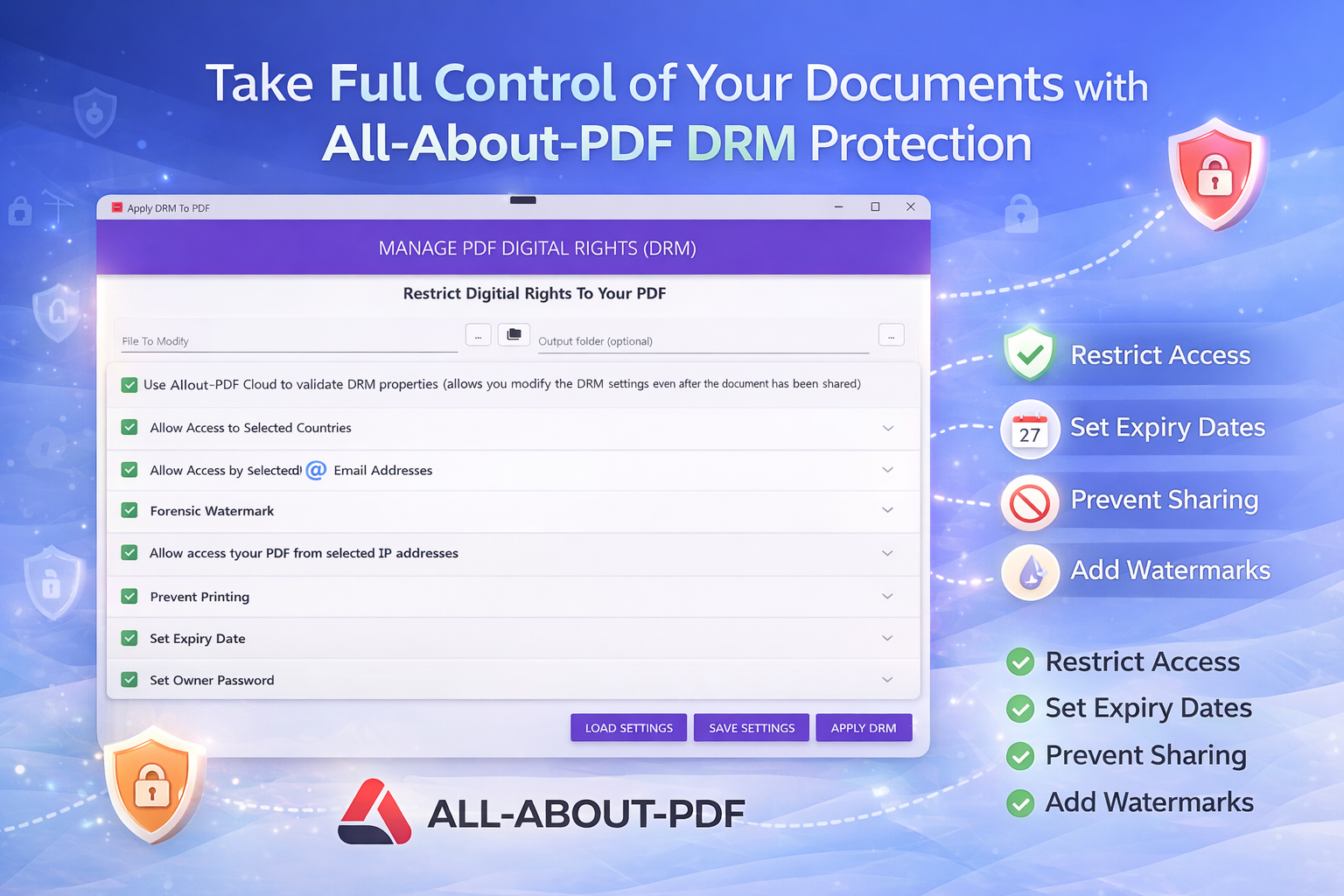
Below is a deep look at the powerful DRM controls included in All-About-PDF.
Centralized DRM Control (Optional Cloud Validation)
All-About-PDF allows you to optionally validate DRM rules through the cloud. This enables dynamic control of documents even after distribution.
This means you can:
- Change access permissions after sending the file
- Revoke access if needed
- Modify expiration rules
- Update allowed users
- Control document behavior remotely
This solves one of the biggest weaknesses of traditional PDFs: static permissions that cannot be changed once sent.
Document Expiration Controls
Sensitive documents should not live forever.
With expiration controls you can:
- Set documents to expire after a fixed date
- Set documents to expire after a number of opens
- Control access duration after first open
- Automatically disable access after expiry
Ideal use cases:
- Financial statements
- Legal documents
- Training materials
- Contracts
- Subscription content
- Proposals
Instead of chasing people to delete documents, access simply ends automatically.
Country-Based Access Restrictions
Need to ensure your document is only accessed in certain regions?
All-About-PDF allows you to restrict document access by country.
You can:
- Allow only specific countries
- Block high-risk regions
- Enforce geographic compliance rules
- Reduce data leakage risks
Useful for:
- Compliance requirements
- Licensing restrictions
- Intellectual property protection
- Export-controlled data
Email-Based Access Control
Control exactly who can open your document.
You can lock a PDF to specific email addresses, ensuring only authorized users can access it.
Capabilities include:
- Allow specific email addresses
- Import emails from CSV
- Import emails from JSON
- Import emails from databases via ODBC
- Prevent unauthorized forwarding
Even if the file is shared, only approved identities can open it.
Common scenarios:
- Customer reports
- HR documents
- Board materials
- Confidential pricing
- Investor updates
Forensic Watermarking Protection
One of the most powerful features is forensic watermarking.
Instead of just visible watermarks, All-About-PDF embeds traceable identity information into documents.
This can include:
- User identity
- Email address
- Access timestamp
- Device identifiers
- Distribution source
This creates accountability.
If a document leaks, you can trace:
- Who accessed it
- Who it was issued to
- Where it originated
- When it was opened
This dramatically reduces intentional leaks because users know documents are traceable.
Common use cases:
- M&A documents
- Legal discovery
- Government documents
- Trade secrets
- Product roadmaps
IP Address Restrictions
Control access down to the network level.
You can restrict document access to:
- Specific IP addresses
- Corporate networks
- Office locations
- VPN ranges
This allows:
- Internal document protection
- Secure partner sharing
- Zero trust access control
- Network-based security enforcement
This is particularly valuable for regulated industries.
Printing Controls
Not every document should be printable.
All-About-PDF allows you to:
- Disable printing completely
- Allow limited printing
- Control how documents can be reproduced
- Prevent uncontrolled distribution via print copies
This helps protect:
- Paid content
- Exam materials
- Confidential reports
- Internal documentation
Prevent Unauthorized Sharing
Forwarding is one of the biggest risks when sharing PDFs.
Our DRM protection helps prevent:
- Unauthorized forwarding
- Copying documents to other devices
- Access outside approved identities
- Unauthorized redistribution
By tying documents to identity and device controls, forwarding becomes ineffective.
Owner Password Protection
Add an additional layer of administrative security with owner password protection.
This allows document owners to:
- Protect DRM configurations
- Prevent unauthorized changes
- Maintain administrative control
- Secure document policies
This ensures only authorized administrators can modify document protections.
Embed Protected Documents Into PDF or HTML Wrappers
All-About-PDF allows you to embed protected PDFe files into:
- PDF wrappers
- HTML viewing containers
This allows you to distribute files with viewing instructions built in, making it easier for recipients to access protected documents securely.
Why All-About-PDF DRM Is Different
Most PDF protection tools only offer passwords or basic encryption.
All-About-PDF focuses on control after distribution, which is where most real risks occur.
Key advantages:
- Identity-based access instead of just passwords
- Device-level restrictions
- Geographic restrictions
- Network restrictions
- Traceable watermarking
- Post-distribution control
- Importable access lists
- Enterprise-grade protection in a simple UI
This moves PDF protection from simple encryption to true document governance.
Built for Real-World Security Needs
All-About-PDF DRM is ideal for:
- Software vendors
- Financial institutions
- Legal firms
- Healthcare organizations
- Consultants
- Training providers
- Publishers
- Engineering firms
If your PDFs contain intellectual property, customer data, or confidential business information, DRM is no longer optional.
Security That Moves at Your Speed
Security should not slow down your workflow.
All-About-PDF was designed to make advanced DRM simple enough for everyday use while powerful enough for enterprise environments.
You can apply advanced protection in minutes without complex setup.
Final Thoughts
Sharing documents should not mean losing control of them.
With All-About-PDF DRM you gain:
- Control
- Visibility
- Traceability
- Flexibility
- Security
Your documents remain yours — wherever they go.