
Businesses process hundreds or even thousands of PDFs every month. Whether it’s contracts, reports, invoices, or compliance documents, most files require multiple steps before they are ready to distribute.
This often includes:
Redacting sensitive information
Updating text
Applying passwords
Adding document protection
Setting expiration controls
Doing this manually is slow, inconsistent, and error-prone.
With the new PDF Workflow Automation feature in All-About-PDF, businesses can now automate these repetitive document processes and ensure every file follows the same security and processing standards.
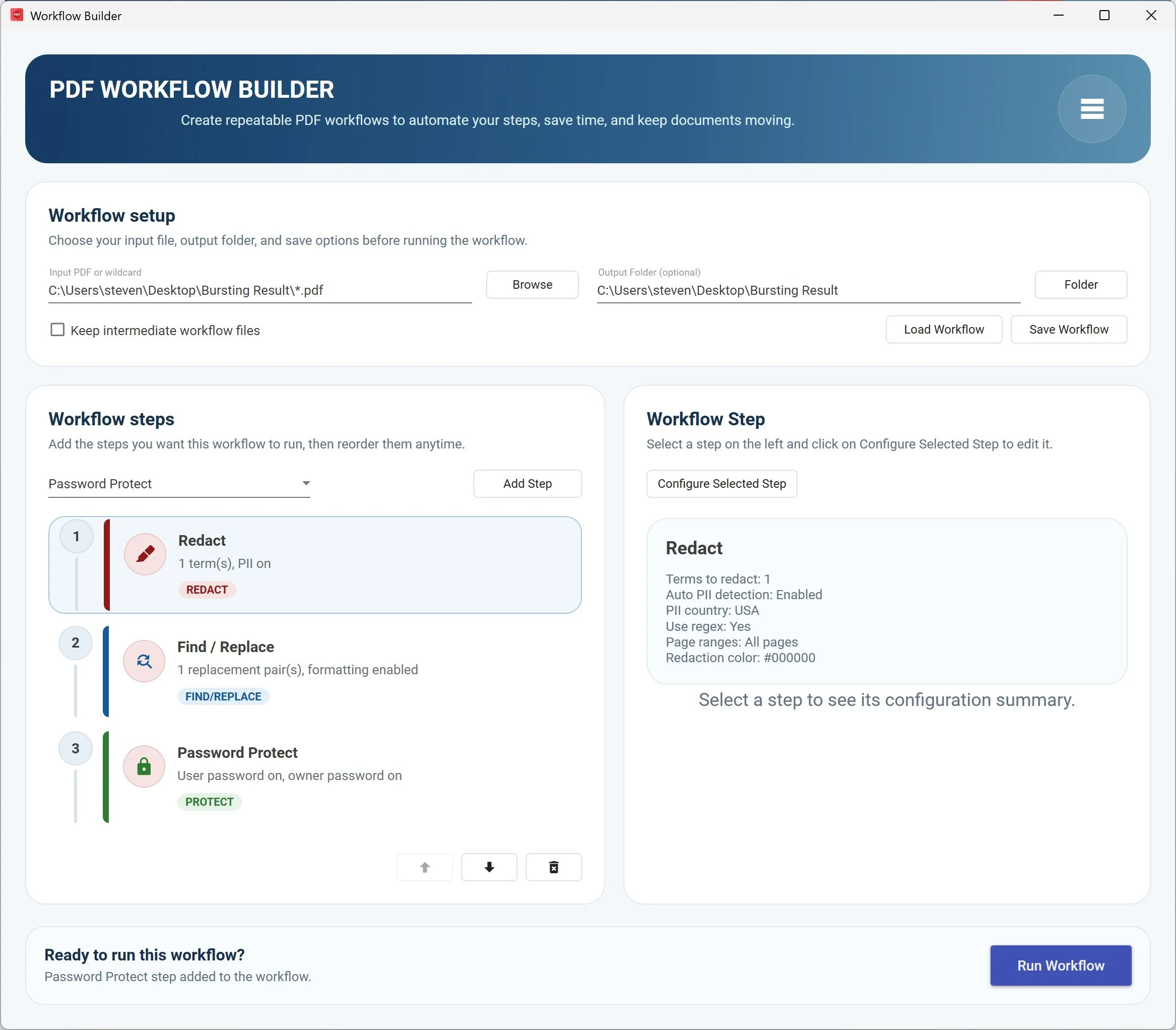
What is PDF Workflow Automation?
PDF Workflow Automation allows you to build automated document processes by chaining multiple PDF actions together into a single workflow.
Instead of performing tasks one at a time, you can create a workflow such as:
Redact confidential data
Find and replace outdated text
Apply password protection
Set document expiration dates
Add DRM protection to control distribution
With one execution, All-About-PDF runs every step automatically. This transforms PDF processing from a manual task into a repeatable business process.
How PDF Workflows Work in All-About-PDF
The workflow builder is designed to be simple but powerful.
STEP 1 - SELECT THE PDF FILE(S)
Select the PDF file you would like to process or use wild cards for multiple PDF files in a folder.
Step 2 – Add workflow steps
Select the PDF operations you want to automate:
Redact
Find / Replace
Password Protect
Set PDF to Expire
Add DRM protection
(more coming soon)
Step 3 – Configure your automation
Each step can be customized to match your business needs:
Examples include:
Automatically redact SSNs, account numbers, or PII
Replace outdated contract language
Apply department-specific password policies
Expire temporary documents automatically
Prevent unauthorized sharing with DRM
Step 4 – Execute the workflow
Run the workflow on your documents and All-About-PDF handles the rest automatically.
No manual repetition. No missed steps. No process gaps.
Save, Load, and Share PDF Workflows
One of the most powerful capabilities is the ability to save workflows as JSON files.
This allows organizations to:
Reuse workflows across departments
Standardize document processing
Quickly load proven workflows
Maintain process consistency
Create reusable document automation templates
Workflows can also be shared with colleagues, allowing teams to follow identical document security procedures.
Instead of writing process documentation, you can simply share the workflow file itself.
This is particularly valuable for organizations that need consistent document handling across teams or locations.
Business Use Cases for PDF Workflow Automation
Legal document processing
Law firms can automatically redact privileged information, apply document protection, and prepare files for external sharing.
HR document security
HR teams can remove personal data, update policy wording, and protect employee documents before distribution.
Financial document protection
Finance departments can secure reports, protect spreadsheets converted to PDF, and control document access.
Compliance automation
Organizations can ensure every document follows required security steps before leaving the company.
Managed service providers
IT and MSP organizations can standardize document processing across multiple clients.
Benefits of PDF Workflow Automation
Organizations using PDF automation typically see improvements in:
Productivity
Document security
Process consistency
Compliance readiness
Error reduction
Time savings
Instead of relying on training and manual procedures, workflows enforce the process automatically.
Why Businesses Are Moving Toward Document Automation
Modern businesses are increasingly adopting document automation tools to eliminate repetitive work and reduce risk.
PDF workflow automation helps organizations:
Scale document processing
Reduce operational overhead
Improve data protection
Enforce document policies
Automate compliance controls
For companies handling sensitive information, automation is quickly becoming a necessity rather than a luxury.
Getting Started with PDF Workflow Automation
The PDF Workflow Automation feature is available in the latest version of All-About-PDF.
You can start by:
Creating your first workflow
Saving it for reuse
Sharing it with your team
Applying it to your document processes
Once implemented, your workflows become reusable building blocks for document automation.
About All-About-PDF
All-About-PDF is a professional PDF processing platform designed for businesses that need more than basic PDF tools. From automation and batch processing to DRM protection and enterprise document controls, it is built to support serious document workflows.