
Summary
Protect sensitive data faster with All‑About‑PDF’s new “Redact All PII” option. Choose a country format (USA or UK), click Redact, and the app automatically finds and removes personally identifiable information across your PDF.
Why this matters
PII exposure is one of the biggest risks in document sharing. Whether you’re handling client contracts, medical records, or financial statements, manually finding every sensitive item is slow—and easy to miss.
What is PII?
Personally Identifiable Information (PII) is any data that can be used to identify a specific person—either on its own or when combined with other information. Common examples include names, email addresses, phone numbers, Social Security numbers, and national ID numbers.
That’s why we added Auto‑Redact PII in All‑About‑PDF: a country‑aware option that scans PDFs for common sensitive patterns (like SSNs or National Insurance numbers) and redacts them for you.
What the feature does
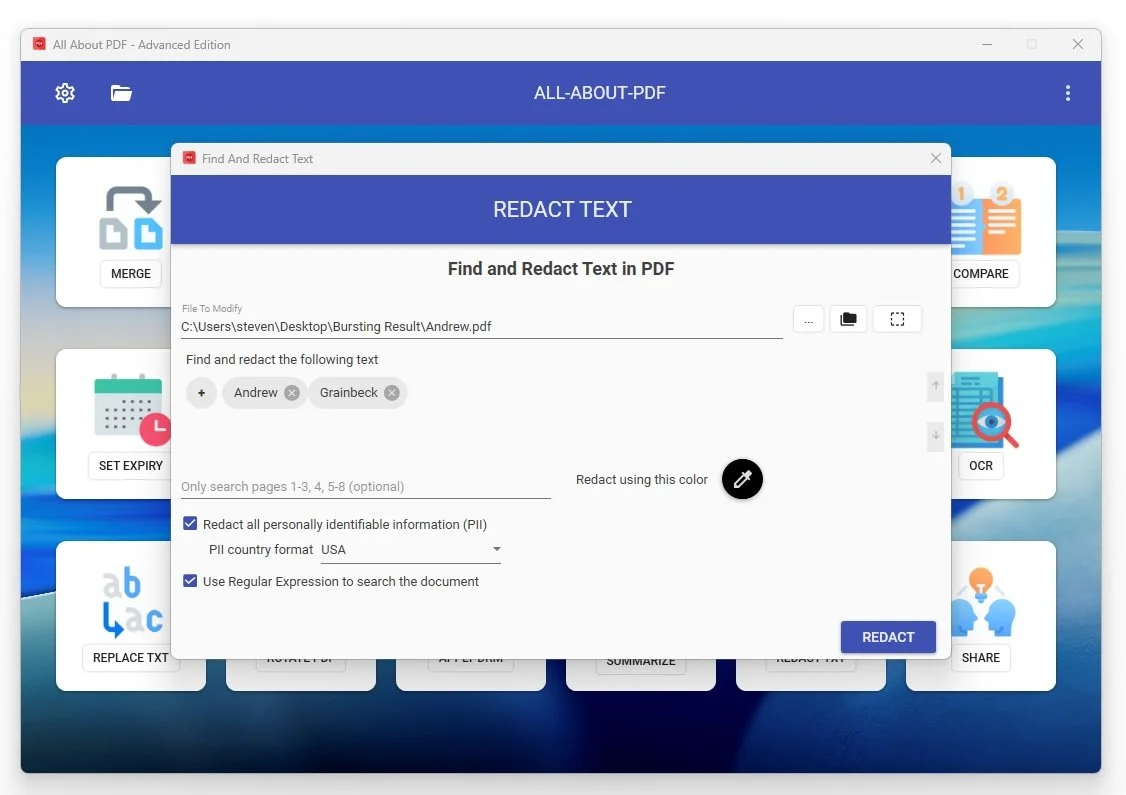
When enabled, the tool will automatically scan the PDF and redact patterns such as:
Common PII (all countries)
Email addresses
Credit‑card‑style number formats
USA
Social Security Numbers (SSN)
Employer Identification Numbers (EIN)
US phone numbers
UK
National Insurance Numbers
NHS numbers
UK mobile numbers
You can still add custom terms (names, project IDs, internal codes) alongside auto‑PII.
How to use Auto‑Redact PII (step‑by‑step)
Open the Redact tool
In All‑About‑PDF, choose Find and Redact Text.Select your PDF
Click … to choose a file, or use the folder option to redact multiple PDFs at once.Enable Auto‑Redact PII
Check “Redact all personally identifiable information (PII)”.Choose a country format
Pick USA, UK, or Generic depending on the document’s origin.(Optional) Add custom terms
You can still add specific words/phrases to redact (names, IDs, etc.).Click REDACT
The app scans and creates a redacted version of your PDF.
Tips for best results
Use the correct country format for the best pattern matching.
Combine with custom words to remove internal identifiers or uncommon PII.
Review the output—automated redaction is powerful, but verification is always a smart last step.
Example use cases
Law firms preparing case files
HR teams sharing employee records
Finance departments distributing invoices
Healthcare providers removing PHI
Ready to try it?
The new PII redaction option is available directly in the Redact tool. If you want us to add more country formats or pattern types, let us know—this feature is built to grow.
Download All-About-PDF today!